
Today we will see how we can use nerdctl to manage containers and images in a containerd environment.
We know that containerd is becoming the de-facto container runtime engine in the container world. With that there is a lot of questions and queries in terms of how we can manage the images and running containers especially when you have a dynamic environment which requires continuous tagging, pushing and pulling of images. Today we will see the tool “nerdctl” which aids us to do all these task.
Nerdctl is a docker compatible CLI for containerd. But to get Nerdctl to work in certain environment some bit of digging and configuring is required.
Installation
To install nerdctl its just downloading and extracting.
Download the latest version from the official GitHub page :
The latest version at the time of writing this is 1.7.5
#wget https://github.com/containerd/nerdctl/releases/download/v1.7.5/nerdctl-full-1.7.5-linux-arm64.tar.gzOnce you download it you need to extract it and place it in the preferred binary location
#tar -Cxzvvf /usr/local nerdctl-full-1.7.5-linux-amd64.tar.gzYou can restart containerd post that.
#systemctl enable --now containerdThe way containerd works is that it has different addresses which are sockets of containers and namespaces on the OS level itself. We need to know where your images and containers are running before we can work with nerdctl. Now it might work in default way in some clusters however I used a K3S Kubernetes cluster and for me it did not list any containers or images in the default way. The below command tells us which socket is being used.
#crictl infoThe information of importance here is “containerdRootDir” and “containerdEndpoint”

We will need to configure the nerdctl to use the container end point address mentioned here.
To check the available namespaces use the below command
# nerdctl -a /run/k3s/containerd/containerd.sock namespace ls
As you see I had to use the address we found above to get the image and container list if i do not use the address I would not be able to list them

Configuration
Similar to containerd nerdctl follows the toml configuration format. By default no configuration file is created when installed by the tar method.
Create configuration directory
#mkdir /etc/nerdctlCreate configuration file
#touch nerdctl.tomlAdd the configuration to the file
#cat <<'EOF' >> /etc/nerdctl/nerdctl.toml
debug          = false
debug_full     = false
address        = "unix:///run/k3s/containerd/containerd.sock"
namespace      = "k8s.io"
snapshotter    = "stargz"
cgroup_manager = "cgroupfs"
hosts_dir      = ["/etc/containerd/certs.d", "/etc/docker/certs.d"]
experimental   = true
EOF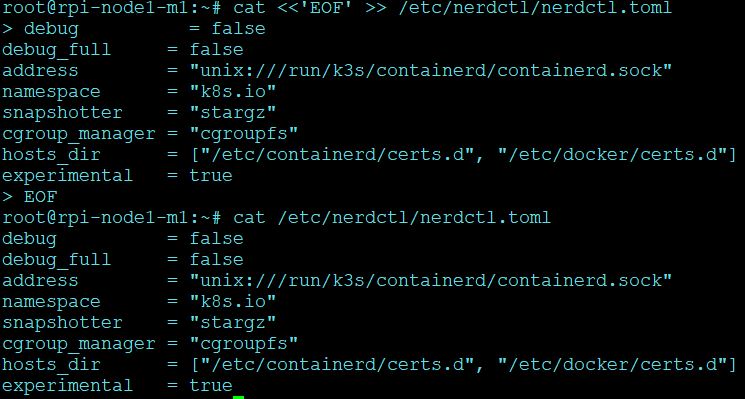
With this you should be able to use nerdctl command without specifically mentioning the address and namespace.
Post this you can start using nerdctl to manage your images, few commands to do so are as below:
To list running containers similar to docker ps
#nerdctl -a /run/k3s/containerd/containerd.sock -n k8s.io ps -aTo commit to an image similar to docker commit
#nerdctl  -a /run/k3s/containerd/containerd.sock -n k8s.io commit <image_id> <image_name>:<tag>

Example:
#nerdctl  -a /run/k3s/containerd/containerd.sock -n k8s.io commit 8159sdas234 test:latest
To save the committed image similar to docker save
#nerdctl -a /run/k3s/containerd/containerd.sock -n k8s.io image save -o <anyname>.tar <image_name>:<tag>

Example:
#nerdctl -a /run/k3s/containerd/containerd.sock -n k8s.io image save -o test.tar test:latest
To load an image from tar similar to docker load
#nerdctl -a /run/k3s/containerd/containerd.sock -n k8s.io load -i test.tarTo login to docker hub using credentials similar to docker login
#nerdctl -a /run/k3s/containerd/containerd.sock -n k8s.io loginTo pull images from docker hub similar to docker pull
#nerdctl -a /run/k3s/containerd/containerd.sock -n k8s.io pull docker.io/<repo_name>/<image_name>:<tag>To push an image to docker hub similar to docker push
#nerdctl -a /run/k3s/containerd/containerd.sock -n k8s.io push <reponame>/<image_name>:<tag>

Example:
#nerdctl -a /run/k3s/containerd/containerd.sock -n k8s.io push repo/test:latest
To list images similar to docker images ls
#nerdctl -a /run/k3s/containerd/containerd.sock -n k8s.io imagesTo delete an image similar to docker rmi
#nerdctl -a /run/k3s/containerd/containerd.sock -n k8s.io rmi <image_id>To forcibly delete an image
#nerdctl -a /run/k3s/containerd/containerd.sock -n k8s.io rmi -f <image_id>To stop a container similar to docker stop
#nerdctl -a /run/k3s/containerd/containerd.sock -n k8s.io stop <container_id>To inspect a container similar to docker inspect
#nerdctl -a /run/k3s/containerd/containerd.sock -n k8s.io inspect <container_id>